

12 Simple Steps For More Website Traffic - Using Pinterest
Pinterest strategy for newbies: A beginner Pinterest guide for those who are interested in Pinterest marketing, lifestyle blogging, or getting consistent traffic to their website using Pinterest.
PINTEREST STRATEGY TIPS
Danarta Harris
4/22/20264 min read
My blog post has affiliate links
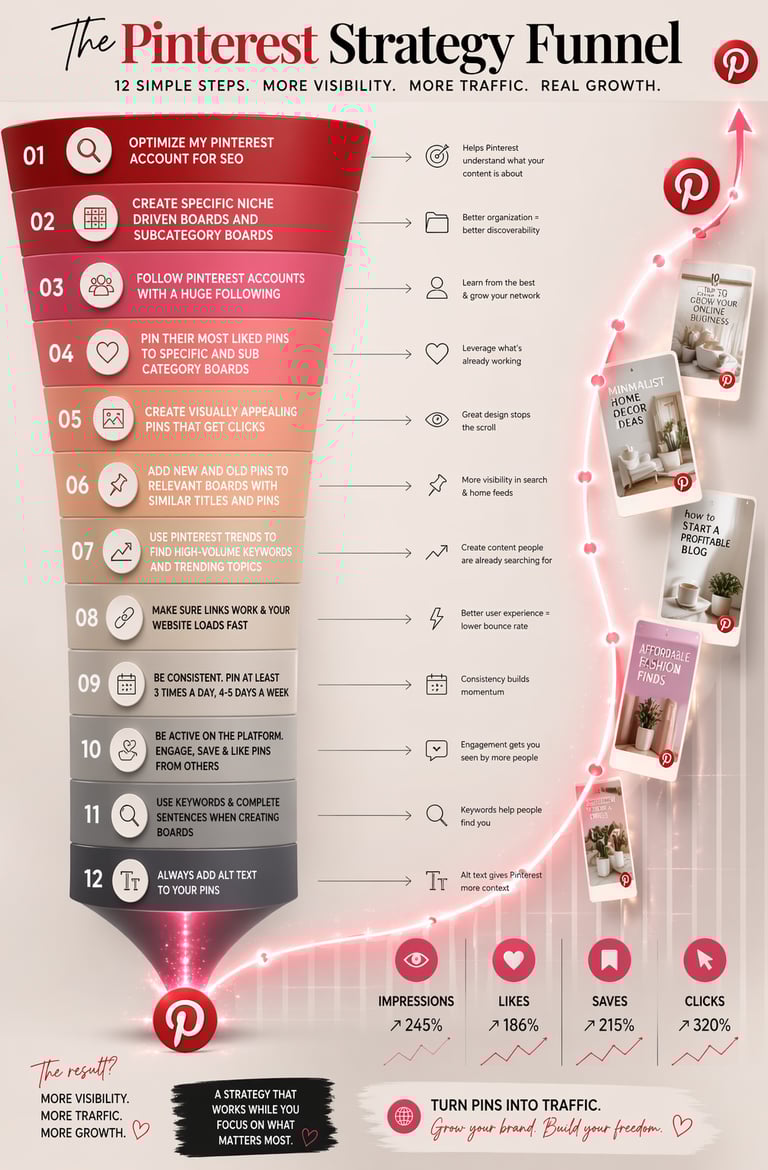
12 Simple Steps For More Website Traffic Using Pinterest
For the longest time, I couldn’t figure out why my website wasn’t getting traffic. I was posting consistently, creating content, and even sharing on social media—but nothing moved the needle. It wasn’t until I refined my Pinterest strategy using these 12 simple steps that everything changed.
Pinterest isn’t just a social platform—it’s a visual search engine. Once I understood that and switched up my strategy, I finally started seeing real traffic.
1. I Optimized My Pinterest Account for SEO
The first mistake I made was treating Pinterest like a casual social profile. I was just scrolling the homefeed, posting here and there, and wondering why I wasn't seeing traffic. Once I optimized my username, bio, and profile description with keywords related to my niche, Pinterest finally understood what my content was about. I have an affiliate website and lifestyle blog centered around fashion, beauty, and home decor. Here's an example of an optimized Pinterest account below
Name: Dan The Fitness Guy | Personal Trainer | Fitness Guru
About: Hi, I'm Dan the fitness guy, and I'm a personal trainer and Fitness Guru. Here you'll find HIIt exercises to burn belly fat, strength training exercises for muscle growth, safe dieting habits, and healthy food recipes.........
Username: Dan The Fitness Guy
This helped my profile and pins show up in search results.
2. I Created Niche-Specific Boards (and Subcategory Boards)
Instead of creating random boards, I focused on specific, keyword-driven boards. I made sure to use keywords that were actively been searched for on Pinterest. You can find these keywords in the home feeds search bar.
For example, instead of “Fashion,” I created:
“Affordable Women’s Fashion Finds”
“Minimalist Jewelry for Women”
“Budget Home Decor Ideas”
Then I created subcategory boards to go even deeper. This made my content more searchable and organized.
Example
Cheap Women's Clothes
Elegant wrist Jewelry
Inexpensive Furniture Where To Buy
3. I Followed High-Performing Pinterest Accounts
I started following accounts with large, engaged audiences in my niche. These accounts were already optimized correctly, which gave me insight into:
What works
What pins perform well
How successful boards are structured
This step helped me learn faster instead of guessing.
Also be sure to save mostly if not all pins with high engagement rates. Look for likes and comments when saving pins.
4. I Repinned High-Performing Content in My Niche
Instead of only posting my own pins, I began saving top-performing pins from those large accounts and adding them to my boards.
This did two things:
Made my boards look more active and valuable
Helped Pinterest associate my profile with trending content
5. I Focused on Creating Visually Appealing Pins
This was a game changer. Pinterest is a visual search engine, so design matters—a lot.
I stopped posting plain images and started creating:
Bright, eye-catching graphics
Easy-to-read text overlays
Clean, professional layouts
The goal became simple: get the click.
More clicks means more traffic to your website or blog, which can lead to higher conversions if you are promoting a product or service.
6. I Reorganized and Reused My Pins Strategically
I didn’t just post a pin once and forget it. I started:
Adding new and old pins to multiple relevant boards
Using boards with similar keywords and themes
This increased the chances of my pins showing up in more searches and home feeds.
be careful when adding the same pin to multiple boards because i don't know if pinterest will categorize this as pin stuffing.
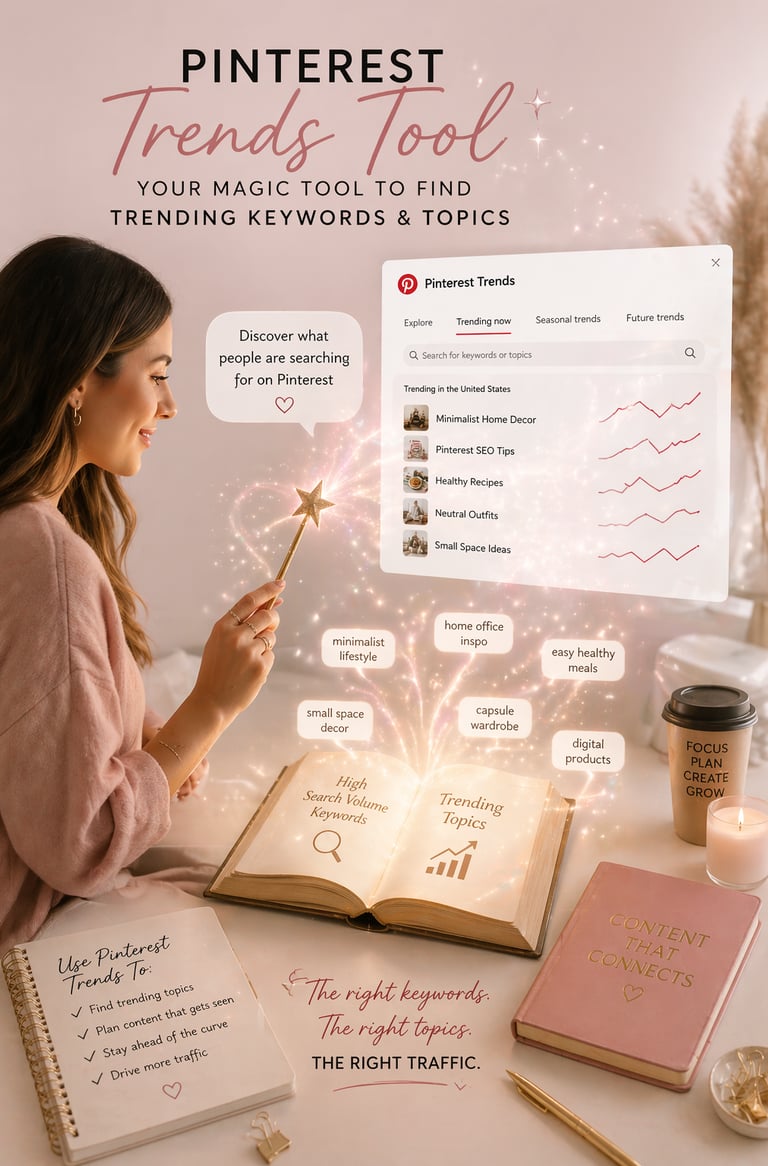
7. I Used Pinterest Trends to Find What People Are Searching
Instead of guessing content ideas, I used Pinterest Trends to discover:
High-volume keywords
Seasonal trends
Upcoming popular topics
This helped me create content people were already looking for—which naturally increased traffic.
8. I Fixed Broken Links and Improved My Website Speed
This step is often overlooked, but it’s critical. Pinterest hates broken links and so do there users. imagine being excited to click on a pin, and even ready to make a purchase. Just to be taken to a 404 page. It's the most frustrating feeling in the world. search engines like pinterest, Google, And Bing will see your website as not providing value. They'll place your website into a dark secluded place (The Last pages) which is where blogs go to die.
So make sure:
All my pins linked correctly
My website loaded quickly
My pages were mobile-friendly
A slow or broken site increases bounce rate—and that signals to search engines that your content isn’t valuable.
9. I Stayed Consistent With Pinning
Consistency made a huge difference. I committed to:
Pinning at least 3 times a day
Staying active 4–5 days a week
I also used tools like Canva to create pins faster without sacrificing quality.
10. I Engaged With Other Pinterest Users
Pinterest rewards activity. I stopped being passive and started:
Saving other people’s pins
Liking relevant content
Engaging with creators in my niche
This increased my visibility and helped push my pins to more users.
11. I Used Keywords When Creating Boards
Instead of short titles, I used complete, keyword-rich descriptions for my boards.
For example:
❌ “Jewelry”
✅ “Affordable Women’s Jewelry for Everyday Style”
This made my boards easier to discover in search.
12. I Added Alt Text to Every Pin
Alt text gives Pinterest more context about your content.
By adding descriptive, keyword-rich alt text, I helped Pinterest better understand:
What my pin is about
Who should see it
This small step can make a big difference in visibility.
Final Thoughts
Once I applied these 12 steps consistently, my traffic finally started growing—and not just from Pinterest, but from search engines too.
The biggest takeaway?
Pinterest isn’t about posting randomly—it’s about being intentional, searchable, and consistent.
If your website isn’t getting traffic, chances are you’re missing a strategy like this. Start applying these steps, and you’ll begin to see the difference. If you're still not getting any blog traffic, try renaming image and product file names. This helps google better understand what your website is about. you can use the google search bar or google trends tool when applying this step. Be sure to be descriptive when naming the file, and remember that some products and image are trademarked and has copy right laws.
I hope this strategy helps you reach the goals your trying to achieve with pinterest, and thanks for reading.
Subscribe to our newsletter
Enjoy exclusive special deals available only to our subscribers.